TINTOlib · Hands-on · Part 1 of 2
From Tabular Data to CNNs, ViTs and Hybrid Models
End-to-end image generation, baselines and multimodal neural architectures.
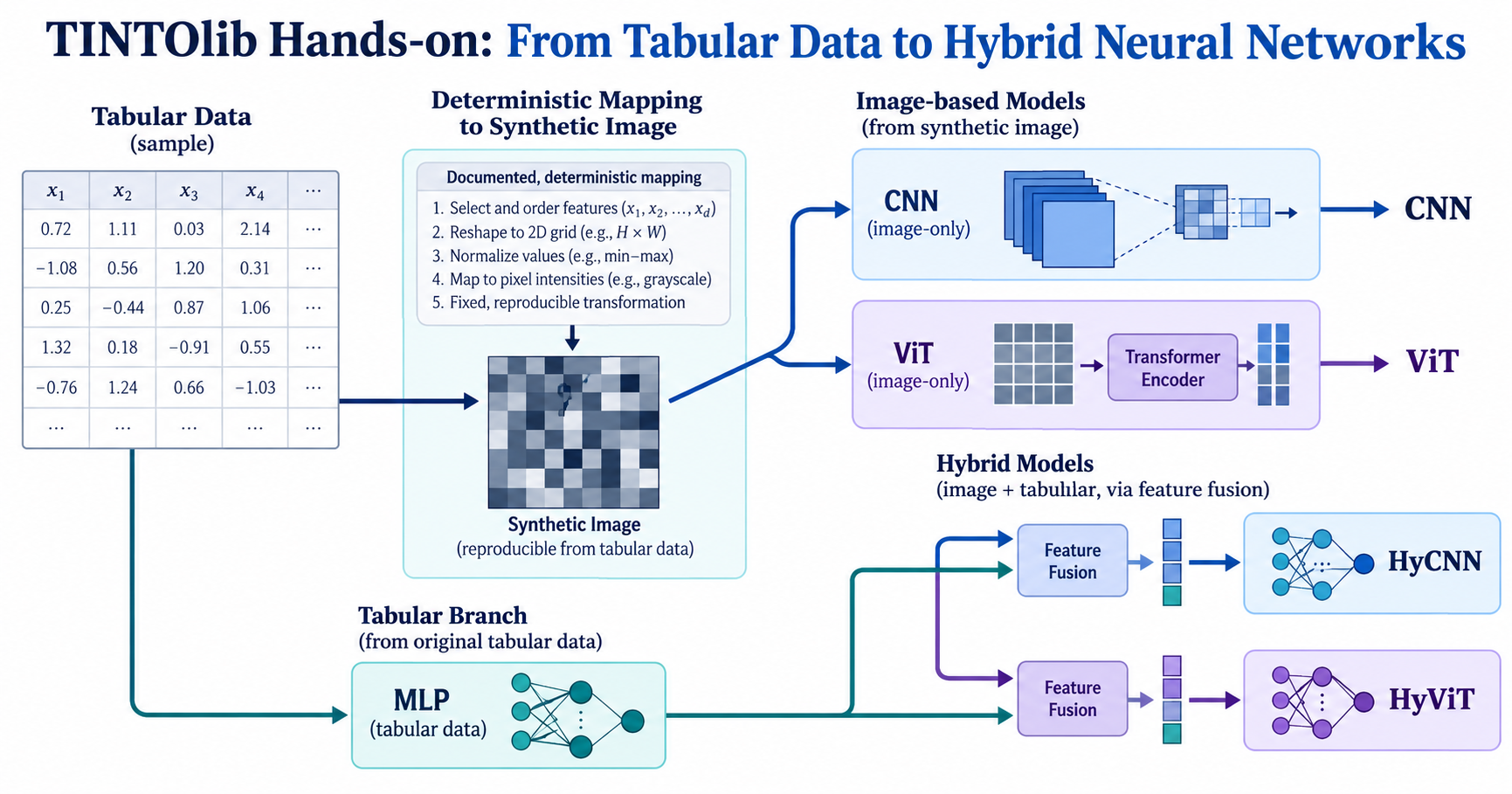
Tutorial metadata
- Author: Manuel Castillo-Cara, PhD
- Affiliation: Dpt. of Artificial Intelligence, Universidad Nacional de Educación a Distancia (UNED), Spain
- Role: Researcher, Professor, and TINTOlib Python Library Developer
- License: CC BY-NC 4.0 unless otherwise stated.
- Environment: The supplied hands-on notebook was developed for Google Colab and includes a REFINED/MPI setup option.
- Source notebook: Download the complete executable notebook.
Evidence status. Figures and numerical tables below have been extracted from the executed notebook supplied with this tutorial. They have not been re-run or independently reproduced during the preparation of these blog posts. Results refer to the demonstration dataset and its specific experimental protocol, not to clinical use or general performance superiority.
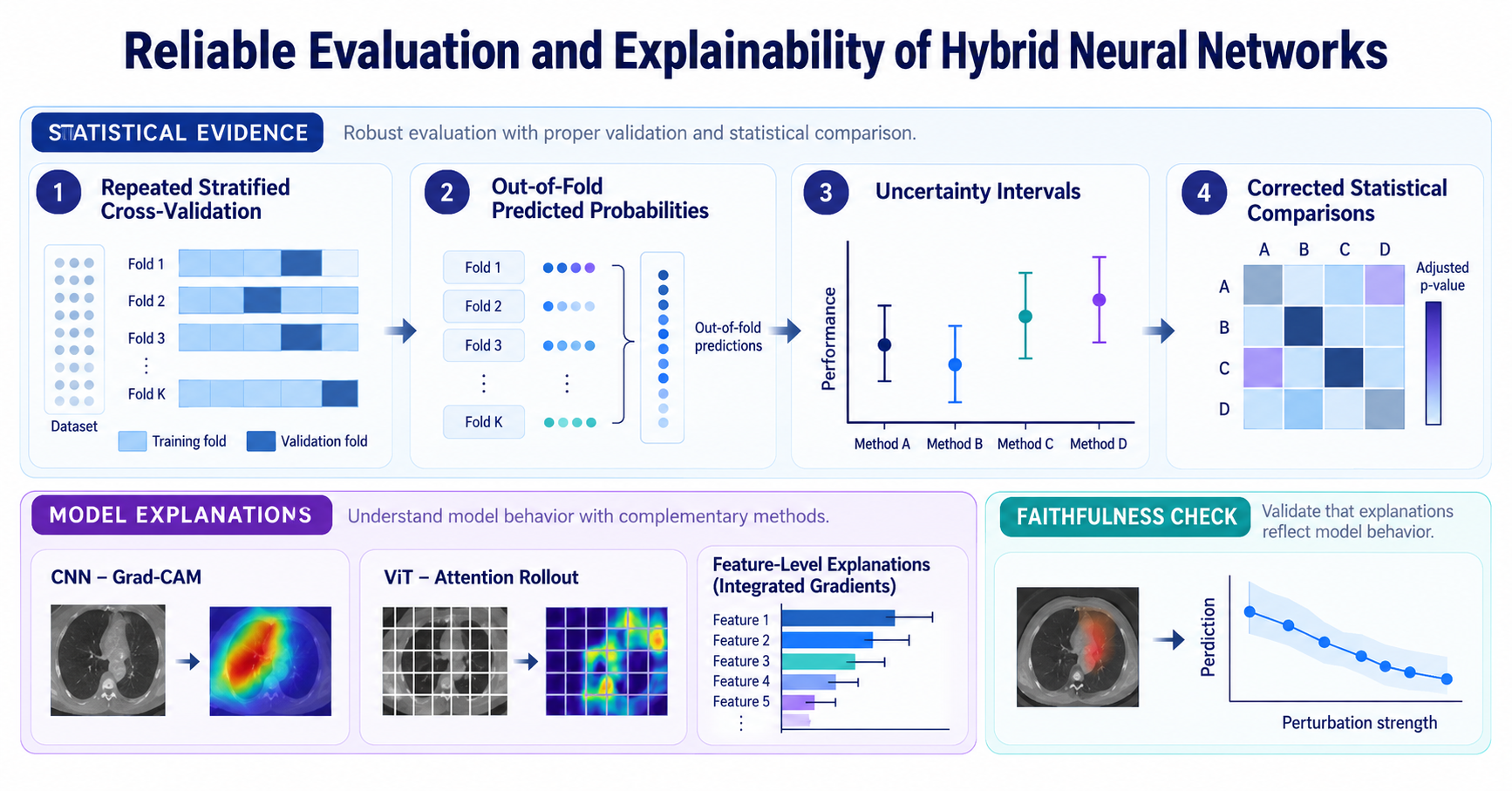
Two-part seminar series. Part I — this article. Part II — Reliable Evaluation and Explainability.
Video overview
The shared seminar video for both parts will be available here once the MP4 is uploaded to the specified path.
From tabular data to neural representations
This two-part hands-on series complements the earlier conceptual articles on TINTOlib. Rather than asking which tabular-to-image method is universally preferable, it follows one concrete dataset through leakage-aware image construction, strong tabular baselines, CNN and ViT encoders, and hybrid architectures. The code and illustrations below come from the supplied executed seminar notebook.
The practical exercise uses the Breast Cancer Wisconsin dataset included in scikit-learn (569 observations, 30 numerical features). Its classification target is used for demonstration only. The tutorial is not a clinical diagnostic evaluation.
Reading guide — Part I of II. This article covers source notebook sections 0–9: context, setup, data and splitting, ten image methods, feature footprints, baselines, IGTD-based network inputs, CNN/ViT/hybrid architectures and a first single-split training run. Part II continues with repeated validation, statistical inference and model explainability.
0. Context
Deep learning dominates images, text and audio, yet on tabular data gradient-boosted trees usually still win. One reason is structure: a CNN or a Vision Transformer expects neighbouring pixels to be related, while the columns of a table have no natural order.
The idea behind TINTOlib is to transform every row of a table into a small synthetic image in which related variables become neighbouring pixels, and then let vision architectures learn from it. Figure 1 summarises the whole pipeline that this notebook implements step by step.
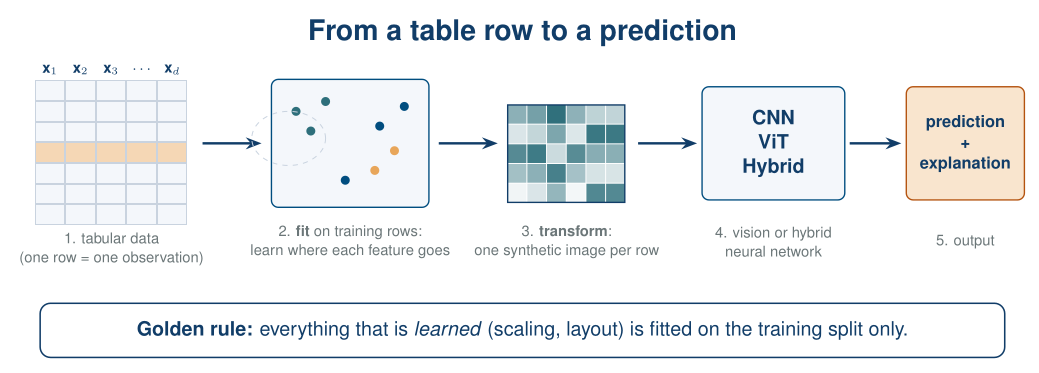
Figure 1. From a table row to a prediction. A transformation is fitted on the training rows, every row is then transformed into a synthetic image, and a vision or hybrid network learns from it. The explanation maps pixels back to the original variables.
Learning objectives.
By the end of this notebook you should be able to transform a tabular dataset with several TINTOlib methods, explain how the main families of methods differ, build CNN, ViT and hybrid (CNN+MLP, ViT+MLP) models in PyTorch, evaluate them reliably with repeated cross-validation, confidence intervals and corrected statistical tests, and explain the CNN and the ViT in terms of the original variables while checking that the explanations are faithful.
Running environment.
The notebook is designed for Google Colab; a free CPU runtime is enough. Sections 1–9 and 11 take about 5 minutes; the reliable evaluation of Section 10 trains every network 10 times and takes about 12 more minutes on a CPU (a GPU runtime makes it faster). REFINED needs MPI: the setup cell installs it on Colab, and if that fails the notebook skips REFINED and carries on. Locally you need Python ≥ 3.9 with PyTorch, scikit-learn, SciPy, matplotlib and TINTOlib.
1. Setup
Colab already includes PyTorch, scikit-learn, SciPy and matplotlib. We install TINTOlib and, for REFINED, an MPI runtime plus mpi4py.
%pip install -q TINTOlib
# Optional, only for REFINED: an MPI runtime and mpi4py. The last line reports whether REFINED can run.
!apt-get -qq install -y openmpi-bin libopenmpi-dev > /dev/null 2>&1; pip install -q mpi4py > /dev/null 2>&1
!which mpirun > /dev/null && python -c "import mpi4py" 2>/dev/null && echo "MPI available: REFINED will run" || echo "MPI not available: REFINED will be skipped"
import os, copy, math, random, shutil, time, warnings

import numpy as np
import pandas as pd
import matplotlib.pyplot as plt
import matplotlib.colors as mcolors
from matplotlib.patches import Patch
from scipy import stats
from scipy.stats import spearmanr

import torch
import torch.nn as nn
import torch.nn.functional as F
from torch.utils.data import TensorDataset, DataLoader

from sklearn.datasets import load_breast_cancer
from sklearn.model_selection import train_test_split, RepeatedStratifiedKFold
from sklearn.preprocessing import MinMaxScaler
from sklearn.linear_model import LogisticRegression
from sklearn.ensemble import HistGradientBoostingClassifier
from sklearn.metrics import (accuracy_score, balanced_accuracy_score, f1_score, roc_auc_score,
                             brier_score_loss)

# TINTOlib: one class per transformation method, all with the same fit / transform interface
from TINTOlib.tinto import TINTO
from TINTOlib.igtd import IGTD
from TINTOlib.refined import REFINED
from TINTOlib.deepInsight import DeepInsight
from TINTOlib.fotomics import Fotomics
from TINTOlib.barGraph import BarGraph
from TINTOlib.featureWrap import FeatureWrap
from TINTOlib.clusters import Clusters

warnings.filterwarnings("ignore")
SEED = 42

def set_seed(seed=SEED):
    random.seed(seed)
    np.random.seed(seed)
    torch.manual_seed(seed)
    torch.cuda.manual_seed_all(seed)

set_seed()
DEVICE = torch.device("cuda" if torch.cuda.is_available() else "cpu")
print("PyTorch", torch.__version__, "| device:", DEVICE)

# Palette and a compact figure style
NAVY, TEAL, ORANGE, GREY = "#113D68", "#2E6F7B", "#E8A65A", "#7F8C9A"
plt.rcParams.update({"figure.dpi": 90, "axes.spines.top": False, "axes.spines.right": False,
                     "axes.titlesize": 10, "axes.titlecolor": NAVY, "font.size": 9})
2. The dataset
We use the Breast Cancer Wisconsin dataset, shipped with scikit-learn, so nothing needs to be downloaded:
- 569 patients and 30 numeric features computed from a digitised image of a breast mass;
- each of 10 measurements (radius, texture, perimeter, area, smoothness, compactness, concavity, concave points, symmetry and fractal dimension) appears three times: its mean, its standard error and its worst value. These groups of strongly correlated variables are exactly what learned image layouts try to exploit, so the images are easy to read;
- binary task: malignant vs. benign.
In scikit-learn,
0 = malignantand1 = benign. We flip the label so that 1 = malignant is the positive class.
data = load_breast_cancer(as_frame=True)
df = data.frame.copy()
df.columns = [c.replace(" ", "_") for c in df.columns]
df["target"] = (data.target == 0).astype(int)          # 1 = malignant, 0 = benign

FEATURES = [c for c in df.columns if c != "target"]
print(f"{df.shape[0]} patients x {len(FEATURES)} features")
df.head()
Notebook output:
569 patients x 30 features
TINTOlib expects a tidy table: one row per observation, numeric features and the target as the last column. That is exactly what we have.
The correlation matrix shows the blocks of strongly related variables, the structure that a good image layout should place close together.
fig, axes = plt.subplots(1, 2, figsize=(11, 4.2), gridspec_kw={"width_ratios": [1, 2.4]})

counts = df["target"].map({0: "benign", 1: "malignant"}).value_counts()
axes[0].bar(counts.index, counts.values, color=[TEAL, ORANGE])
axes[0].set_title("Class balance")
axes[0].set_ylabel("patients")

im = axes[1].imshow(df[FEATURES].corr(), cmap="RdBu_r", vmin=-1, vmax=1)
axes[1].set_title("Correlation between the 30 features")
axes[1].set_xticks(range(len(FEATURES)))
axes[1].set_xticklabels(FEATURES, rotation=90, fontsize=6)
axes[1].set_yticks(range(len(FEATURES)))
axes[1].set_yticklabels(FEATURES, fontsize=6)
fig.colorbar(im, ax=axes[1], fraction=0.03)
plt.tight_layout()
plt.show()
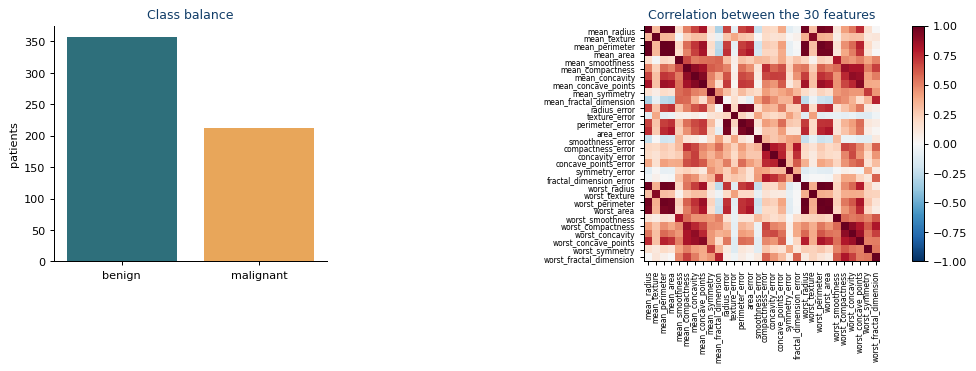
(Class distribution and feature correlations in the Breast Cancer Wisconsin dataset.)
3. Split first, transform later
Many TINTOlib methods learn something from the data: a scaler, a 2-D projection, an optimal arrangement of features. That learning must use training rows only; validation and test rows are transformed afterwards with the frozen method, exactly as with a scikit-learn scaler (Figure 2).
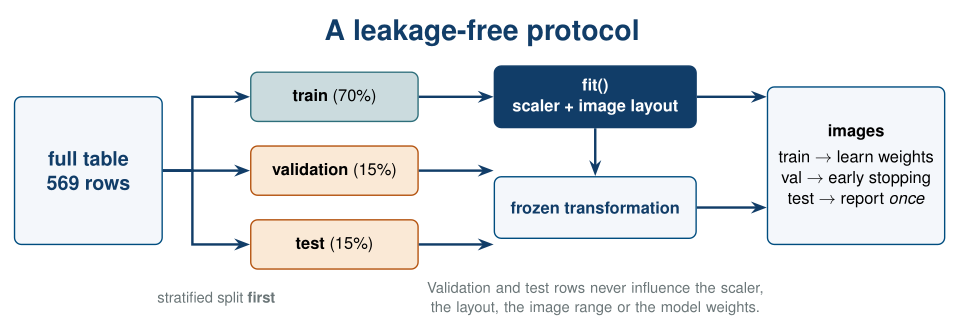
Figure 2. Leakage-free protocol. The table is split first; the scaler and the image layout are fitted on the training split and then applied, frozen, to validation and test. The test split is used once, to report the final results.
In Sections 3–9 we use one stratified 70/15/15 split. It is the clearest way to follow the pipeline step by step, and Section 11 reuses it to explain the models. It is not enough to estimate performance reliably on 569 patients; Section 10 repeats the whole pipeline with cross-validation to obtain estimates that can be reported.
train_df, temp_df = train_test_split(df, test_size=0.30, stratify=df["target"], random_state=SEED)
val_df, test_df = train_test_split(temp_df, test_size=0.50, stratify=temp_df["target"], random_state=SEED)
train_df, val_df, test_df = [d.reset_index(drop=True) for d in (train_df, val_df, test_df)]

SPLITS = {"train": train_df, "val": val_df, "test": test_df}
for name, d in SPLITS.items():
    print(f"{name:<5}: {len(d):3d} patients, {d['target'].mean():.0%} malignant")
4. From rows to images: a gallery of methods
Every TINTOlib method follows the same two steps:
method.fit(train_df)                          # learn the transformation on training rows
method.transform(test_df, folder="img/test")  # write one image per row + an index CSV
The methods fall into three families (Figure 3).
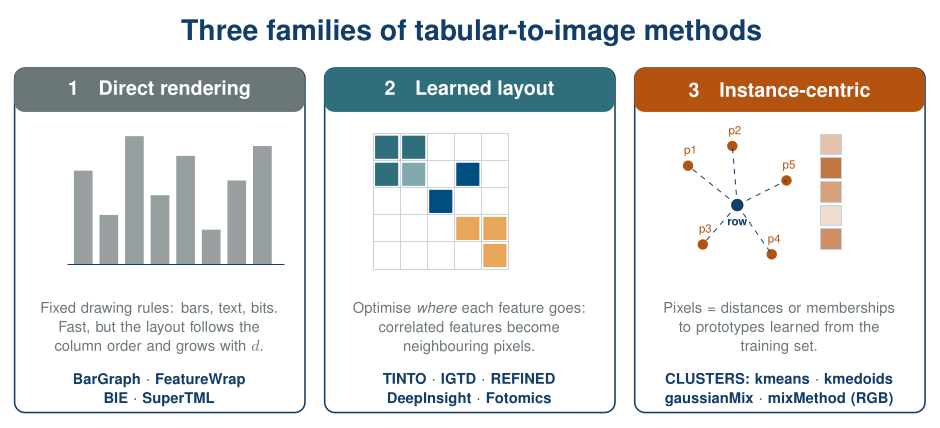
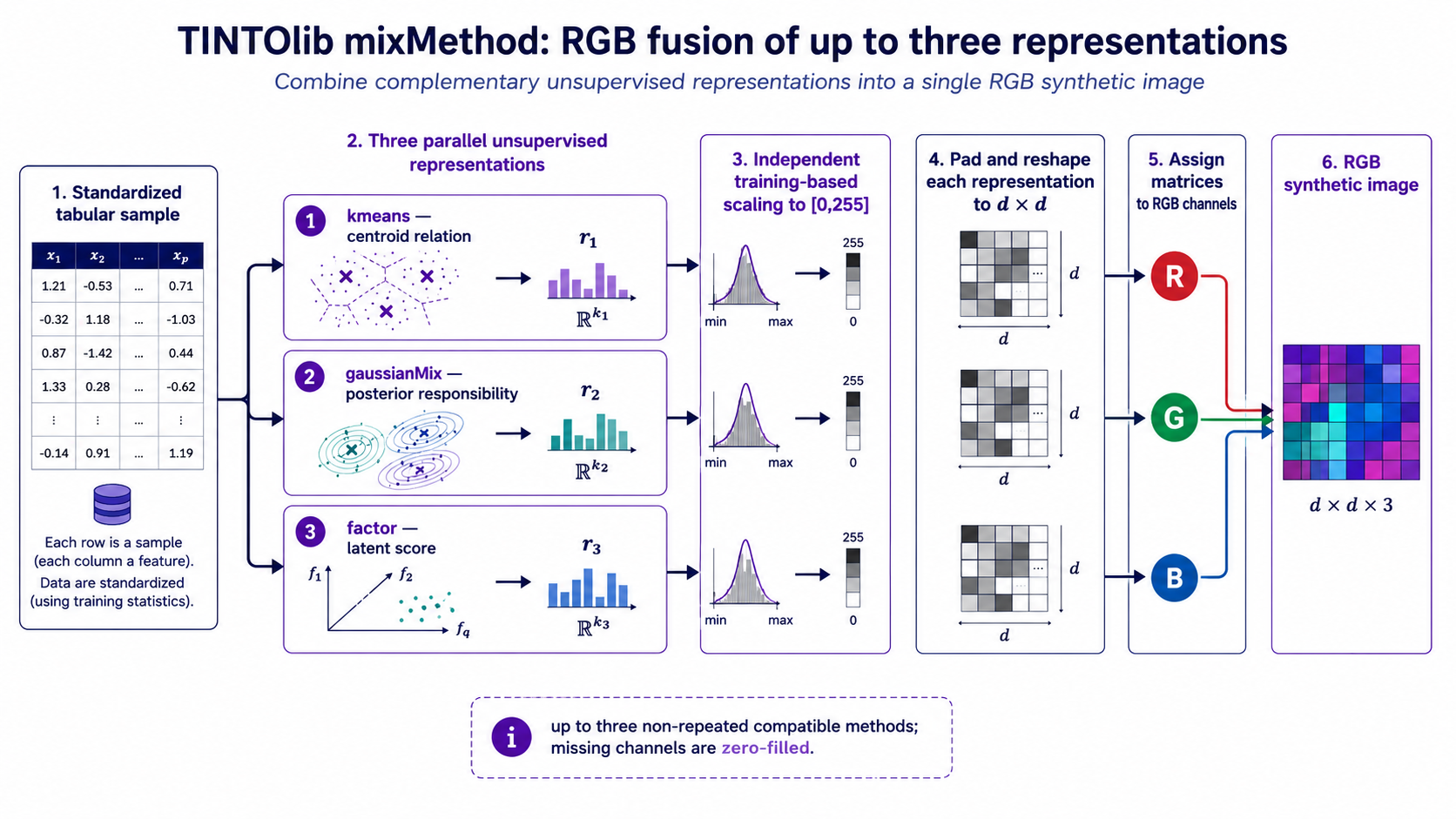
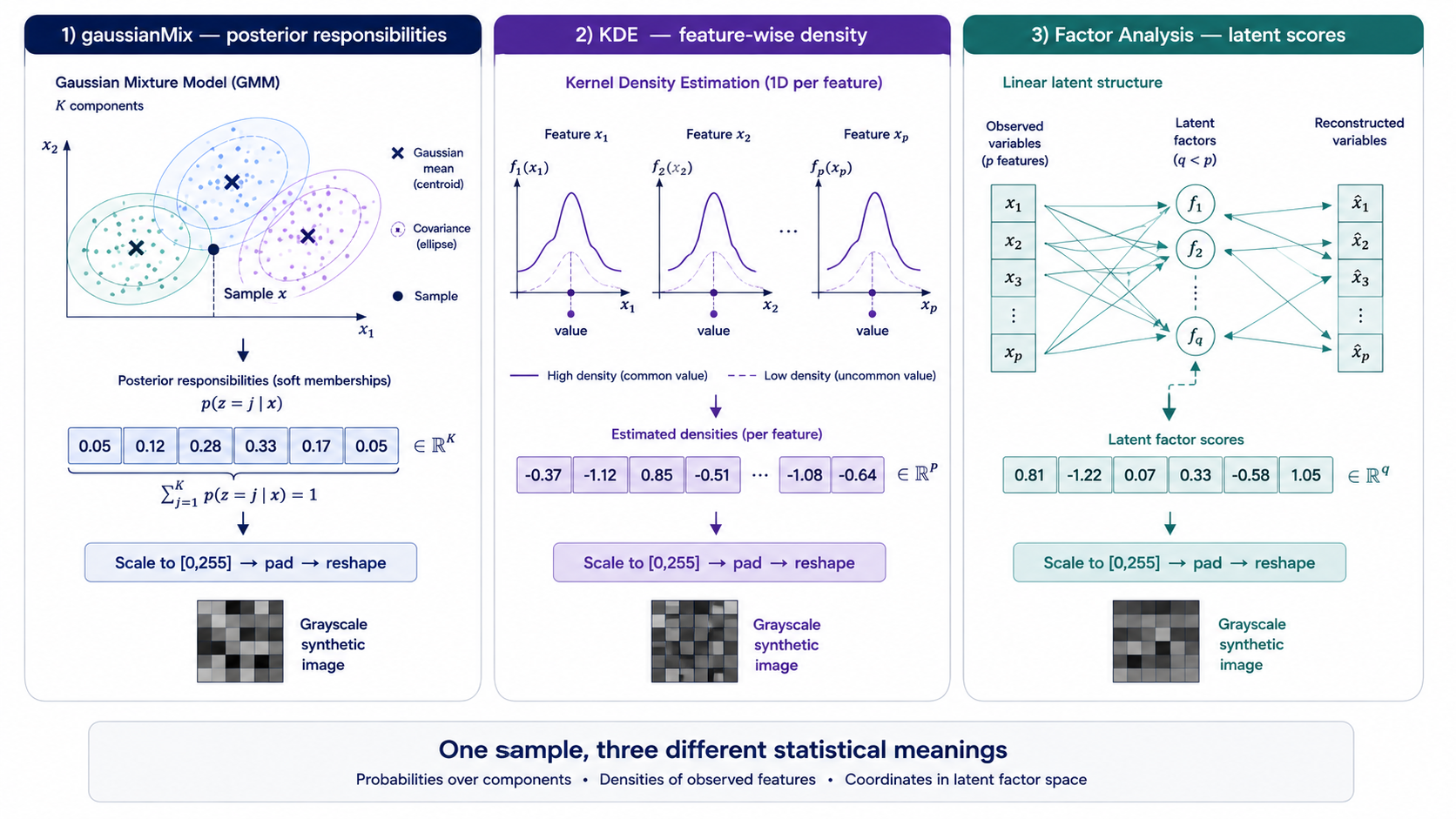
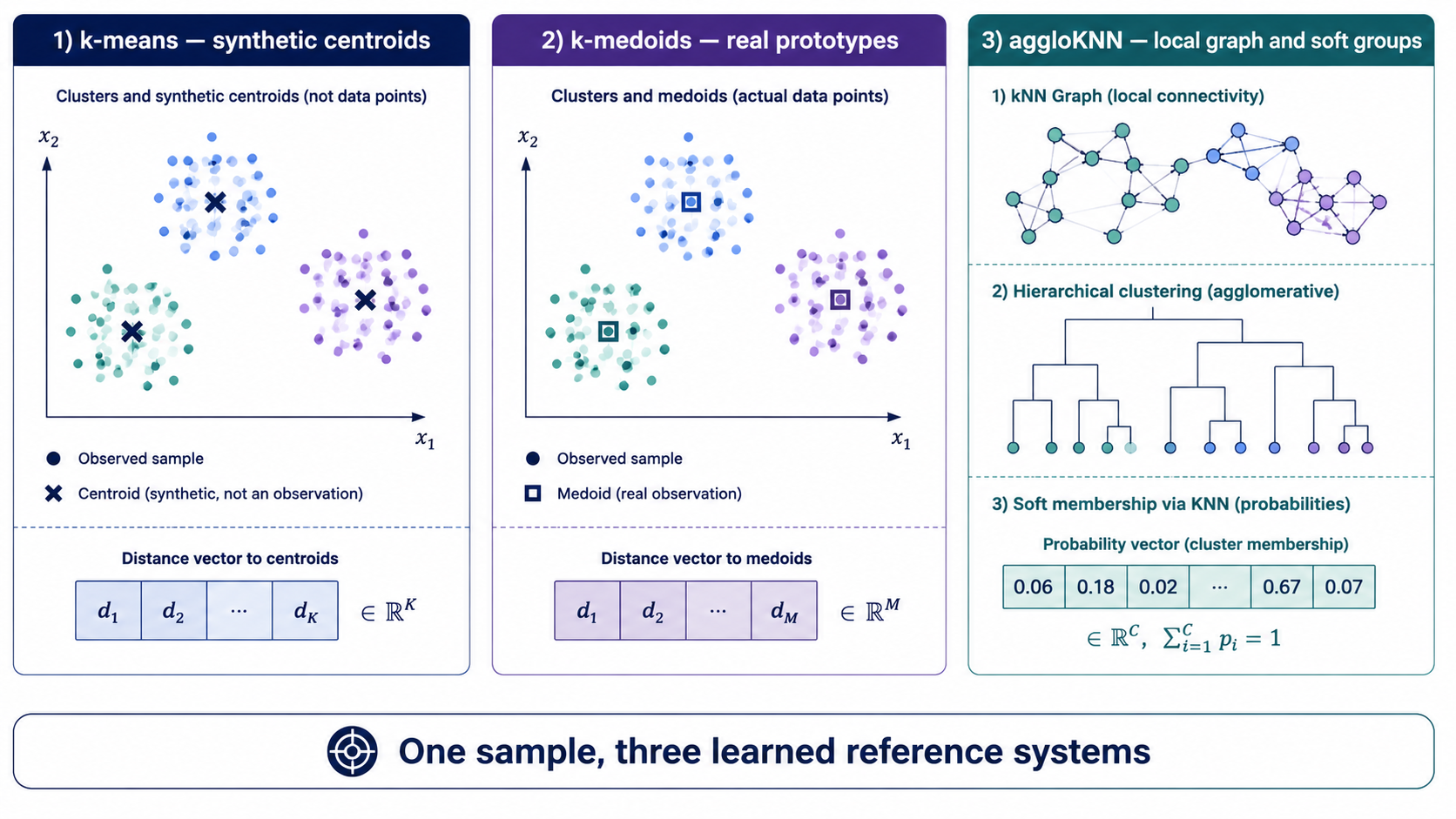
Figure 3. Three families of tabular-to-image methods. Direct rendering draws the values with fixed rules, learned layouts optimise where each feature is placed, and instance-centric methods (CLUSTERS) encode how a row relates to prototypes learned from the training set.

Figure 4. The three classic learned layouts on the same input row: TINTO (PCA or t-SNE projection, optional blurring), IGTD (optimised permutation on a grid) and REFINED (multidimensional scaling plus hill-climbing).
4.1. Generating the images
The helper below wraps the two steps, writes the images to disk and reads them back in row order. It receives the partitions as an argument, so Section 10 can reuse it inside every cross-validation fold.
PNG or npy?
Learned-layout methods can save the raw numeric matrix (format="npy") instead of a PNG. A PNG is colour-scaled image by image, so the absolute level of a pixel is not comparable across patients;npykeeps the exact values. We usenpywhenever the method allows it.
IMG_ROOT = "tintolib_images"

def to_gray(imgs):
    # PNG files come back as RGB(A); collapse them to one channel. 2-D arrays pass through.
    return imgs[..., :3].mean(-1) if imgs.ndim == 4 else imgs

def read_images(folder):
    # TINTOlib writes the images plus an index CSV ('images' = relative path, 'values' = label)
    index = pd.read_csv(os.path.join(folder, "supervised.csv"))
    imgs = []
    for rel_path in index["images"]:
        path = os.path.join(folder, rel_path)
        img = np.load(path) if path.endswith(".npy") else plt.imread(path)
        imgs.append(img.astype(np.float32))
    return np.stack(imgs), index["values"].to_numpy()

def to_images(method, name, splits=None, verbose=True):
    # Fit on the TRAINING partition only, then transform every partition with the frozen method
    splits = SPLITS if splits is None else splits
    out = os.path.join(IMG_ROOT, name)
    shutil.rmtree(out, ignore_errors=True)
    t0 = time.time()
    method.fit(splits["train"])
    images = {}
    for split, frame in splits.items():
        folder = os.path.join(out, split)
        method.transform(frame, folder=folder)
        images[split], labels = read_images(folder)
        assert (labels == frame["target"].to_numpy()).all(), "image order does not match row order"
    if verbose:
        shape = "x".join(str(s) for s in images["train"].shape[1:3])
        print(f"{name:<22} {shape:>7} pixels   {time.time() - t0:5.1f} s")
    return images
gallery_methods = {
    # Learned layout (parametric)
    "TINTO":              TINTO(problem="supervised", pixels=20, blur=False, format="npy", random_seed=SEED),
    "TINTO + blur":       TINTO(problem="supervised", pixels=20, blur=True, format="npy", random_seed=SEED),
    "IGTD":               IGTD(problem="supervised", scale=[5, 6], max_step=2000, val_step=100, format="npy", random_seed=SEED),
    "REFINED":            REFINED(problem="supervised", hcIterations=5, n_processors=2, format="npy", random_seed=SEED),
    "DeepInsight":        DeepInsight(image_dim=12, problem="supervised", format="npy", random_seed=SEED),
    "Fotomics":           Fotomics(image_dim=12, problem="supervised", format="npy", random_seed=SEED),
    # Direct rendering (non-parametric)
    "BarGraph":           BarGraph(problem="supervised", pixel_width=2, gap=1),
    "FeatureWrap":        FeatureWrap(problem="supervised", size=(8, 8), bins=10),
    # Instance-centric (CLUSTERS)
    "CLUSTERS kmedoids":  Clusters(problem="supervised", algorithm="kmedoids", n_clusters=16, random_seed=SEED),
    "CLUSTERS mixMethod": Clusters(problem="supervised", algorithm="mixMethod",
                                   ensamMethod=["kmeans", "gaussianMix", "kmedoids"], n_clusters=16, random_seed=SEED),
}
LEARNED, DIRECT, INSTANCE = "learned layout", "direct", "instance-centric"
FAMILY = {"TINTO": LEARNED, "TINTO + blur": LEARNED, "IGTD": LEARNED, "REFINED": LEARNED,
          "DeepInsight": LEARNED, "Fotomics": LEARNED, "BarGraph": DIRECT, "FeatureWrap": DIRECT,
          "CLUSTERS kmedoids": INSTANCE, "CLUSTERS mixMethod": INSTANCE + " (RGB)"}

gallery = {}
for name, method in gallery_methods.items():
    try:
        gallery[name] = to_images(method, name.replace(" ", "_"))
    except Exception as err:                       # REFINED needs MPI; skip it if MPI is not available
        print(f"{name:<22} skipped: {type(err).__name__}: {str(err)[:80]}")
Notebook output:
TINTO                    20x20 pixels     0.2 s
TINTO_+_blur             20x20 pixels     0.2 s
IGTD                       5x6 pixels     0.2 s
REFINED                    6x6 pixels     2.5 s
DeepInsight              12x12 pixels     0.2 s
Fotomics                 12x12 pixels     0.2 s
BarGraph                 91x91 pixels     0.4 s
FeatureWrap                8x8 pixels     0.3 s
CLUSTERS_kmedoids          4x4 pixels     0.2 s
CLUSTERS_mixMethod         4x4 pixels     0.2 s
4.2. Same patient, ten pictures
Here is the same test patient drawn by every method. Every picture re-encodes the same row of 30 numbers.
def show_img(ax, name, img):
    # Same colour map and value range for every patient of a given method
    if img.ndim == 3:                                   # RGB(A): show as is
        ax.imshow(img, interpolation="nearest")
    else:
        train = gallery[name]["train"]
        cmap = getattr(gallery_methods[name], "cmap", None) or "gray"
        ax.imshow(img, cmap=cmap, vmin=train.min(), vmax=train.max(), interpolation="nearest")
    ax.set_xticks([]); ax.set_yticks([])

patient = int(np.flatnonzero(test_df["target"].to_numpy() == 1)[0])   # first malignant test patient

n = len(gallery)
fig, axes = plt.subplots(2, math.ceil(n / 2), figsize=(2.5 * math.ceil(n / 2), 6.2))
for ax in axes.ravel():
    ax.axis("off")
for ax, (name, imgs) in zip(axes.ravel(), gallery.items()):
    img = imgs["test"][patient]
    ax.axis("on")
    show_img(ax, name, img)
    ax.set_title(f"{name}\n{FAMILY[name]} · {img.shape[0]}x{img.shape[1]} px", fontsize=9)
fig.suptitle(f"One malignant patient (test row {patient}) encoded by {n} TINTOlib methods", fontsize=12, color=NAVY)
plt.tight_layout(rect=(0, 0, 1, 0.93))
plt.subplots_adjust(hspace=0.55)
plt.show()
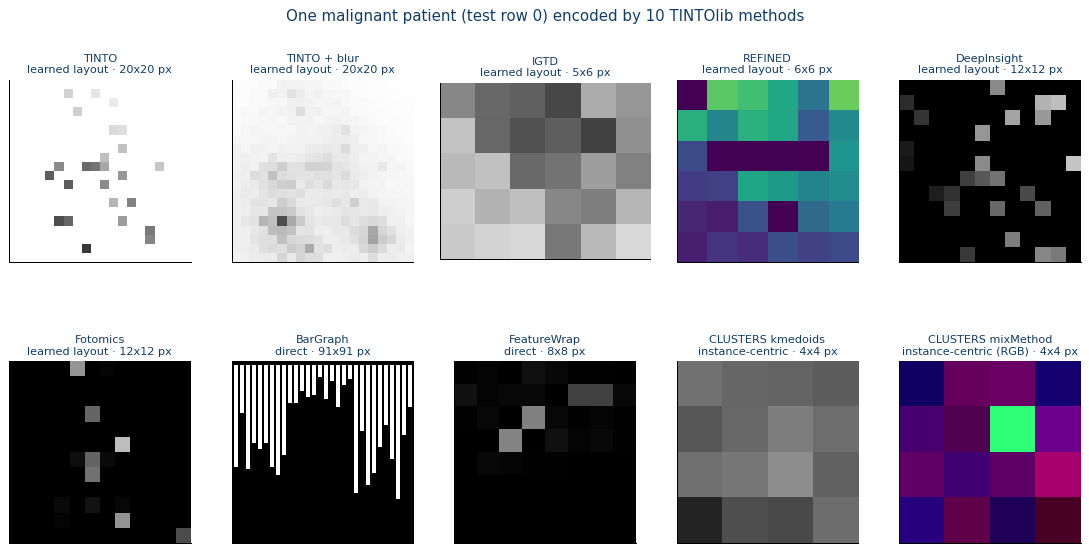
(One held-out observation represented with ten different TINTOlib methods. The plotted outputs are taken directly from the supplied notebook.)
What to notice
- Learned layouts (TINTO, IGTD, REFINED, DeepInsight, Fotomics) are compact: one pixel, or a small blob, per feature, placed by a projection or an optimisation fitted on the training data.
- Blurring in TINTO spreads each feature over its neighbours, which convolutional filters like, but it makes pixels harder to trace back to a single variable.
- Direct renderings (BarGraph, FeatureWrap) follow the column order of the table and grow with the number of features.
- CLUSTERS does not draw the variables at all: with
kmedoids, its 16 pixels are distances to 16 prototype patients learned from the training set;mixMethodstacks three such views (k-means, Gaussian mixture, k-medoids) as the red, green and blue channels of one image. - REFINED places the 30 features on a 6×6 grid (36 cells): the cells without a feature keep a constant value, visible as the uniform dark band in Section 4.3. The gallery shows it with its default viridis colour map.
4.3. Do benign and malignant patients look different?
For four methods we average the training images of each class and subtract them.
How to read these maps.
Every image here has a single channel. The colours are a colour map applied for display, not RGB channels: the first two columns use a grey scale, and the difference uses a red–blue scale (red: the pixel is, on average, higher for malignant patients; blue: higher for benign ones). Note that IGTD paints high values dark (a TINTOlib convention), so for IGTD a feature that is larger in malignant patients appears blue, while for TINTO it appears red.
show = [m for m in ["TINTO", "IGTD", "REFINED", "CLUSTERS kmedoids"] if m in gallery]
y_train = train_df["target"].to_numpy()

fig, axes = plt.subplots(len(show), 3, figsize=(7.6, 2.3 * len(show)))
for row, name in zip(np.atleast_2d(axes), show):
    imgs = to_gray(gallery[name]["train"])
    mean_benign, mean_malig = imgs[y_train == 0].mean(0), imgs[y_train == 1].mean(0)
    diff = mean_malig - mean_benign
    lim = np.abs(diff).max()
    vmin, vmax = min(mean_benign.min(), mean_malig.min()), max(mean_benign.max(), mean_malig.max())
    row[0].imshow(mean_benign, cmap="gray", vmin=vmin, vmax=vmax, interpolation="nearest")
    row[1].imshow(mean_malig, cmap="gray", vmin=vmin, vmax=vmax, interpolation="nearest")
    im = row[2].imshow(diff, cmap="RdBu_r", vmin=-lim, vmax=lim, interpolation="nearest")
    fig.colorbar(im, ax=row[2], fraction=0.046, pad=0.04)
    for ax, title in zip(row, ["mean benign", "mean malignant", "malignant - benign"]):
        ax.set_title(title); ax.set_xticks([]); ax.set_yticks([])
    row[0].set_ylabel(name, fontsize=10, color=NAVY, fontweight="bold")
plt.tight_layout()
plt.show()
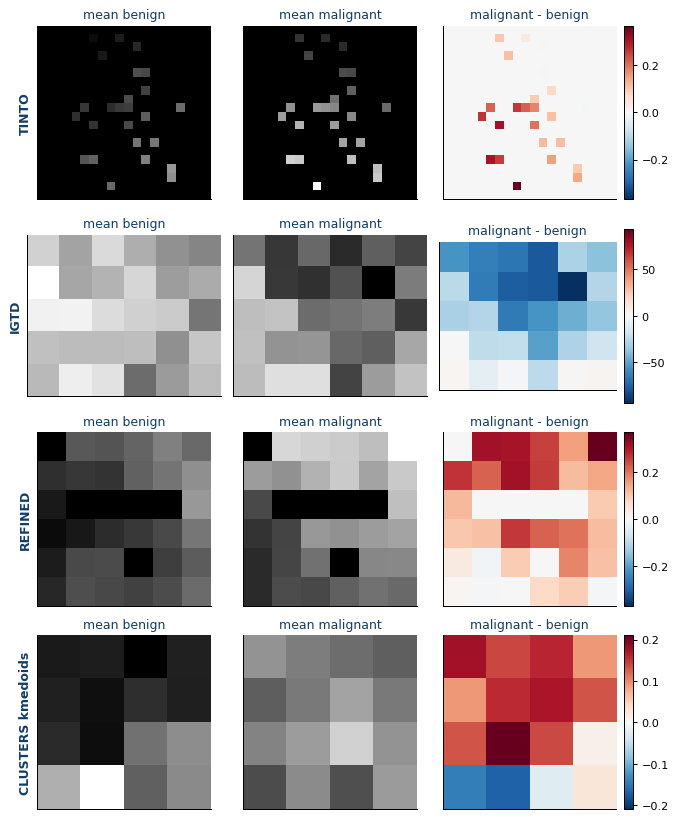
(Training-set mean synthetic images and class differences for four representations. These are descriptive visualizations, not causal explanations.)
The class signal is visible to the naked eye, and each method exposes it differently. This is why, in large benchmarks, the choice of transformation matters more than the choice of network.
5. Where is each variable?
To explain a model trained on synthetic images we need a map from pixels back to variables. We compute it empirically, in a way that works for any method (Figure 5).
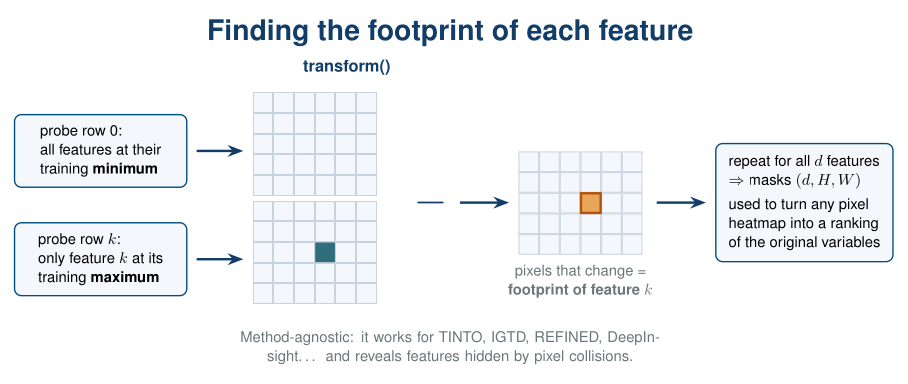
Figure 5. Finding the footprint of each feature. A probe row with every feature at its training minimum is compared with probes in which a single feature is raised to its maximum; the pixels that change are that feature’s footprint.
MEASURES = ["radius", "texture", "perimeter", "area", "smoothness", "compactness",
            "concavity", "concave_points", "symmetry", "fractal_dimension"]
GROUP_COLOUR = {"mean": TEAL, "error": GREY, "worst": ORANGE}

def group_of(name):
    return "mean" if name.startswith("mean_") else "worst" if name.startswith("worst_") else "error"

def measure_of(name):
    return name.replace("mean_", "").replace("worst_", "").replace("_error", "")

def feature_footprints(method, train_frame=None, threshold=0.5):
    # Boolean masks (n_features, H, W): which pixels move when each feature moves
    train_frame = train_df if train_frame is None else train_frame
    lo, hi = train_frame[FEATURES].min(), train_frame[FEATURES].max()
    rows = [lo.to_numpy(copy=True)]
    for k in range(len(FEATURES)):
        r = lo.to_numpy(copy=True)
        r[k] = hi.iloc[k]
        rows.append(r)
    probe = pd.DataFrame(rows, columns=FEATURES)
    probe["target"] = 0
    folder = os.path.join(IMG_ROOT, "_probe")
    shutil.rmtree(folder, ignore_errors=True)
    method.transform(probe, folder=folder)
    imgs = to_gray(read_images(folder)[0])
    diff = np.abs(imgs[1:] - imgs[0])
    peak = diff.reshape(len(FEATURES), -1).max(axis=1)
    masks = diff >= threshold * peak[:, None, None]
    masks[peak == 0] = False          # features that never show up in the image
    return masks

def plot_layout(masks, title, ax, label="name"):
    # Colour each footprint by feature group and label it with the measurement name or number
    H, W = masks.shape[1:]
    canvas = np.ones((H, W, 3)) * np.array([0.96, 0.97, 0.98])
    for k, m in enumerate(masks):
        canvas[m] = np.array(mcolors.to_rgb(GROUP_COLOUR[group_of(FEATURES[k])]))
    ax.imshow(canvas, interpolation="nearest")
    ax.set_xticks(np.arange(-0.5, W, 1), minor=True)
    ax.set_yticks(np.arange(-0.5, H, 1), minor=True)
    ax.grid(which="minor", color="white", lw=2 if H < 10 else 0.8)
    ax.tick_params(which="both", length=0)
    ax.set_xticklabels([]); ax.set_yticklabels([])
    for k, m in enumerate(masks):
        if m.any():
            r, c = np.argwhere(m).mean(0)
            meas = measure_of(FEATURES[k])
            text = meas.replace("_", "\n") if label == "name" else str(MEASURES.index(meas) + 1)
            ax.text(c, r, text, ha="center", va="center", color="white", fontweight="bold",
                    fontsize=9 if label == "name" else 7.5)
    ax.set_title(title, fontsize=11)
layout = {name: feature_footprints(gallery_methods[name]) for name in ["IGTD", "TINTO"]}

fig = plt.figure(figsize=(13, 5.2))
gs = fig.add_gridspec(1, 3, width_ratios=[1.25, 1, 0.42])
ax0, ax1, ax2 = fig.add_subplot(gs[0]), fig.add_subplot(gs[1]), fig.add_subplot(gs[2])
plot_layout(layout["IGTD"], "IGTD: one cell per feature (5x6)", ax0, label="name")
plot_layout(layout["TINTO"], "TINTO: PCA projection on a 20x20 canvas", ax1, label="number")

ax2.axis("off")
ax2.legend(handles=[Patch(color=GROUP_COLOUR[g], label=l) for g, l in
                    [("mean", "mean"), ("error", "standard error"), ("worst", "worst")]],
           loc="upper left", frameon=False, fontsize=10, title="Colour = group", title_fontsize=10)
ax2.text(0.02, 0.62, "Number = measurement", fontsize=10, fontweight="bold", color=NAVY, transform=ax2.transAxes)
for i, m in enumerate(MEASURES, 1):
    ax2.text(0.02, 0.62 - 0.058 * i, f"{i:>2}  {m.replace('_', ' ')}", fontsize=9.5, transform=ax2.transAxes)
plt.tight_layout()
plt.show()

hidden = [FEATURES[k] for k, m in enumerate(layout["TINTO"]) if not m.any()]
print(f"TINTO: {len(FEATURES) - len(hidden)} of {len(FEATURES)} features are visible.")
print("Hidden because another feature was projected onto the same pixel:", ", ".join(hidden))
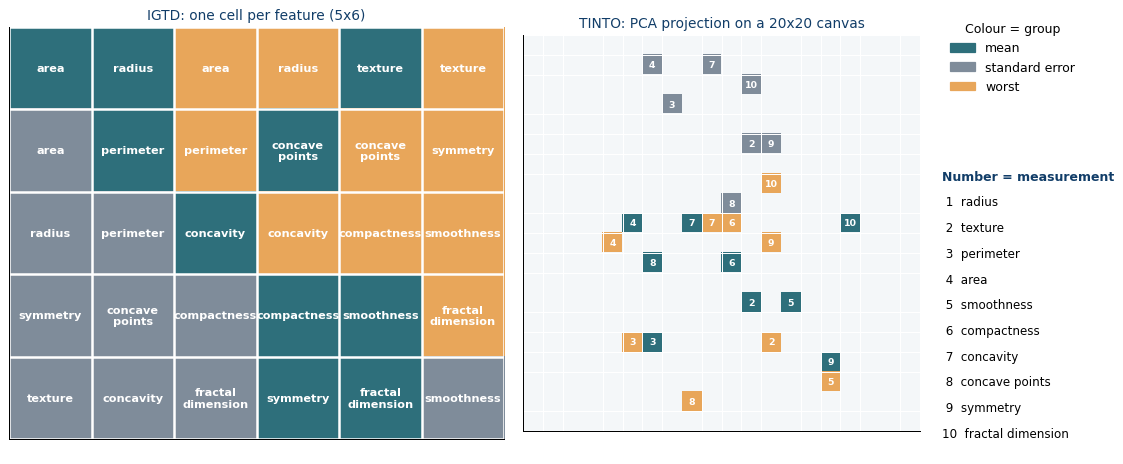
(Feature-footprint maps and pixel-to-variable mappings obtained from the training-fitted transformation.)
Notebook output:
TINTO: 25 of 30 features are visible.
Hidden because another feature was projected onto the same pixel: mean_radius, radius_error, smoothness_error, compactness_error, worst_radius
Reading the maps
- IGTD gives every feature its own cell and places related features side by side: the size measurements (radius, perimeter, area) cluster together, and so do the shape measurements (concavity, concave points, compactness).
- TINTO projects the features with PCA. Features with very similar profiles are projected onto the same pixel, and only one of them stays visible. More pixels or the t-SNE option can separate them.
Why this matters.
An image that hides variables is a concrete reason for hybrid networks: an MLP branch fed with the original table still sees every variable.
6. Classical baselines
Any honest comparison starts with strong tabular models trained on exactly the same data. The scaler is fitted on training rows only; the same scaled table will feed the MLP branch of the hybrid networks.
We report threshold-based metrics (accuracy, balanced accuracy, F1 for the malignant class), a ranking metric (ROC-AUC) and the Brier score, the mean squared error of the predicted probabilities. The Brier score is a proper scoring rule: it rewards probabilities that are both discriminative and well calibrated, and it does not saturate when ROC-AUC is already close to 1. Lower is better:
\[\text{Brier} = \frac{1}{N}\sum_{i=1}^{N}(p_i - y_i)^2,\]where $p_i$ is the predicted probability of malignancy and $y_i \in {0, 1}$ the true label. A perfect model scores 0; always predicting the prevalence (37% malignant) scores 0.234, and always predicting 0.5 scores 0.25.
scaler = MinMaxScaler().fit(train_df[FEATURES])
X_tab = {s: scaler.transform(d[FEATURES]).astype(np.float32) for s, d in SPLITS.items()}
y = {s: d["target"].to_numpy() for s, d in SPLITS.items()}

# Metric and model names, defined once and reused in every table
ACC, BACC, F1, AUC, BRIER = "accuracy", "balanced acc.", "F1 (malignant)", "ROC-AUC", "Brier"
LOGREG, GBOOST = "Logistic regression", "Gradient boosting"

def metrics(y_true, prob, threshold=0.5):
    pred = (prob >= threshold).astype(int)
    return {ACC: accuracy_score(y_true, pred),
            BACC: balanced_accuracy_score(y_true, pred),
            F1: f1_score(y_true, pred),
            AUC: roc_auc_score(y_true, prob),
            BRIER: brier_score_loss(y_true, prob)}

def report(name, y_true, prob):
    return {"model": name, **metrics(y_true, prob)}

baseline_results = []
logreg = LogisticRegression(max_iter=5000).fit(X_tab["train"], y["train"])
baseline_results.append(report(LOGREG + " (table)", y["test"], logreg.predict_proba(X_tab["test"])[:, 1]))

hgb = HistGradientBoostingClassifier(random_state=SEED).fit(X_tab["train"], y["train"])
baseline_results.append(report(GBOOST + " (table)", y["test"], hgb.predict_proba(X_tab["test"])[:, 1]))

pd.DataFrame(baseline_results).set_index("model").round(3)
Recorded notebook output (not recomputed for this article):
| model | accuracy | balanced acc. | F1 (malignant) | ROC-AUC | Brier |
|---|---|---|---|---|---|
| Logistic regression (table) | 0.965 | 0.953 | 0.951 | 1 | 0.026 |
| Gradient boosting (table) | 0.977 | 0.969 | 0.968 | 0.999 | 0.019 |
Both baselines are already very strong (accuracy 0.965 and 0.977), and on this test partition their ROC-AUC is saturated (≥ 0.999): it can no longer separate the models, which is why we also track the Brier score (0.026 and 0.019). The goal is to understand the pipeline, not to beat a leaderboard; on harder, high-dimensional or small datasets the picture changes (see the benchmark in the references).
7. Images for the neural networks
For the deep models we pick one method. We use IGTD because every feature gets its own cell, which makes the explanations of Section 11 exact:
scale=[5, 6]gives exactly 30 cells for our 30 features, andzoom=4enlarges each cell into a 4x4 block, so the image is 20x24 pixels;- with a ViT patch size of 4, each of the 30 ViT tokens is exactly one feature;
format="npy"keeps the exact numeric values.
The method is created by a small factory, make_method(), so that Section 10 can build a fresh, unfitted copy inside every cross-validation fold.
Try
METHOD = "TINTO"later and rerun the notebook from here.
METHOD = "IGTD"     # or "TINTO"
PATCH = 4           # ViT patch size (must divide the image size)

def make_method(seed=SEED):
    # A fresh, unfitted transformation
    if METHOD == "IGTD":
        return IGTD(problem="supervised", scale=[5, 6], max_step=2000, val_step=100,
                    zoom=4, format="npy", random_seed=seed)
    return TINTO(problem="supervised", pixels=20, blur=False, format="npy", random_seed=seed)

model_method = make_method()
raw = to_images(model_method, f"model_{METHOD}")
masks = feature_footprints(model_method)            # pixel footprint of each feature, used for XAI
H, W = raw["train"].shape[-2:]
print("image size:", (H, W), "| visible features:", int(sum(m.any() for m in masks)))
7.1. A real-world pitfall: batch-dependent scaling
A synthetic image is only useful if the same patient always produces the same image. We can check it: the value of each feature’s cell should be a fixed function of that feature (scaled with the training scaler), whatever partition the patient belongs to.
The function below compares three hypotheses on how the stored pixels relate to the scaled features and picks the one that reproduces them exactly, partition by partition:
- as saved: pixels are already the scaled values (TINTO);
- inverted, training range: pixels are
255 · (1 − value)with the training range (what we would expect from IGTD); - inverted, batch range: pixels are rescaled with the minimum and maximum of the batch being transformed.
What we found.
In TINTOlib 1.3.1, IGTD rescales every call totransform()with the minimum and maximum of the rows it receives. Our validation partition reaches 1.28 times the training maximum, so its images are compressed relative to the training images. The network then sees a shifted distribution at validation and test time: noisy validation curves and poorly calibrated probabilities (high ROC-AUC but low accuracy). We undo the shift explicitly so that every partition is on the training scale. The issue has been reported to the developers.
AS_SAVED, INV_TRAIN, INV_BATCH = ("as saved", "inverted, training range",
                                  "inverted, batch range")

def match_error(img, z, masks):
    # mean |cell value - scaled feature| over the visible features
    errs = [np.abs(img[:, m].mean(1) - z[:, k]).mean() for k, m in enumerate(masks) if m.any()]
    return float(np.mean(errs))

def restore_scale(raw_split, z, masks):
    # Put the images of one partition on the TRAINING scale: (N, 1, H, W) tensor, chosen hypothesis, errors
    a = raw_split / 255.0 if raw_split.max() > 1.5 else raw_split
    lo, hi = z.min(), z.max()                             # z: features already scaled with the training scaler
    candidates = {AS_SAVED: a, INV_TRAIN: 1 - a, INV_BATCH: lo + (1 - a) * (hi - lo)}
    errors = {k: match_error(v, z, masks) for k, v in candidates.items()}
    best = min(errors, key=errors.get)
    return candidates[best][:, None].astype(np.float32), best, errors

X_img = {}
for split in SPLITS:
    X_img[split], best, errors = restore_scale(raw[split], X_tab[split], masks)
    print(f"{split:<5} feature range [{X_tab[split].min():+.2f}, {X_tab[split].max():.2f}]  ->  "
          f"best match: {best:<36}" + "  ".join(f"{k}: {v:.3f}" for k, v in errors.items()))

assert H % PATCH == 0 and W % PATCH == 0, "choose a PATCH that divides the image size"
Notebook output:
train feature range [+0.00, 1.00]  ->  best match: inverted, training range            as saved: 0.566  inverted, training range: 0.000  inverted, batch range: 0.000
val   feature range [+0.00, 1.28]  ->  best match: inverted, batch range               as saved: 0.582  inverted, training range: 0.054  inverted, batch range: 0.000
test  feature range [-0.10, 1.07]  ->  best match: inverted, batch range               as saved: 0.516  inverted, training range: 0.050  inverted, batch range: 0.000
After the correction every cell holds the scaled feature value (bright = high) on the training scale, in every partition. Values slightly above 1 in validation or test are kept: they are genuine, because those patients exceed the training maximum, and the MLP branch sees exactly the same numbers.
7.2. Final tensors
print("image tensor:", X_img["train"].shape, "| tokens per image for the ViT:", (H // PATCH) * (W // PATCH))

fig, axes = plt.subplots(1, 8, figsize=(12, 2.0))
examples = list(np.flatnonzero(y["train"] == 0)[:4]) + list(np.flatnonzero(y["train"] == 1)[:4])
for ax, i in zip(axes, examples):
    ax.imshow(X_img["train"][i, 0], cmap="magma", vmin=0, vmax=1, interpolation="nearest")
    ax.set_title("malignant" if y["train"][i] else "benign"); ax.axis("off")
plt.suptitle(f"Images of {METHOD} that the networks will see (one channel, magma colour map, bright = high)",
             color=NAVY, fontsize=10)
plt.tight_layout()
plt.show()
Notebook output:
image tensor: (398, 1, 20, 24) | tokens per image for the ViT: 30

(Eight training examples encoded using IGTD. The magma palette is used for visualization; the networks receive single-channel numerical images.)
How to read these images
One channel, coloured for display.
Each image is a 20×24 matrix of numbers with a single channel: the network receives a tensor of shape(1, 20, 24), not a colour image. The colours are added bymatplotlibwhen it applies the magma colour map, which maps low values to black and purple and high values to orange and light yellow. It is used instead of a grey scale because it is perceptually uniform: the eye distinguishes small differences in value more easily.
- Each 4×4 block is one variable. IGTD places the 30 variables on a 5×6 grid and
zoom=4enlarges every cell into a 4×4 block, which is why you see 5 rows and 6 columns of blocks. The variable behind each block is given by the footprints (masks) computed in this section. - Bright = high value. After the correction of Section 7.1, every block holds the value of its variable scaled between 0 (training minimum) and 1 (training maximum). This is the opposite of the original TINTOlib IGTD images, which paint high values dark.
- Why malignant images are brighter. Almost every variable (size, concavity, concave points, compactness…) is larger in malignant tumours, so their images contain more bright blocks. Because IGTD places correlated variables next to each other, the bright areas tend to cluster.
- The classes overlap. Some malignant patients have images that look like benign ones, which is why the task is not trivial and must be evaluated as in Section 10.
- The examples are the first four patients of each class in the training partition: they illustrate the pattern, they do not prove it. Section 4.3 compares the mean image of each class.
- In validation and test some values slightly exceed 1 (patients above the training maximum). With
vmin=0, vmax=1those pixels are displayed saturated in the brightest colour, but the network receives their actual value.
8. Four architectures
The image branches are written as encoders that return an embedding, so the same code serves the image-only models and the hybrids (Figure 6).
| Model | Image branch | Tabular branch | Fusion |
|---|---|---|---|
| CNN | small convolutional network | none | none |
| ViT | Vision Transformer on 4x4 patches | none | none |
| HyCNN | the same CNN | MLP on the 30 original features | concatenation |
| HyViT | the same ViT | MLP on the 30 original features | concatenation |
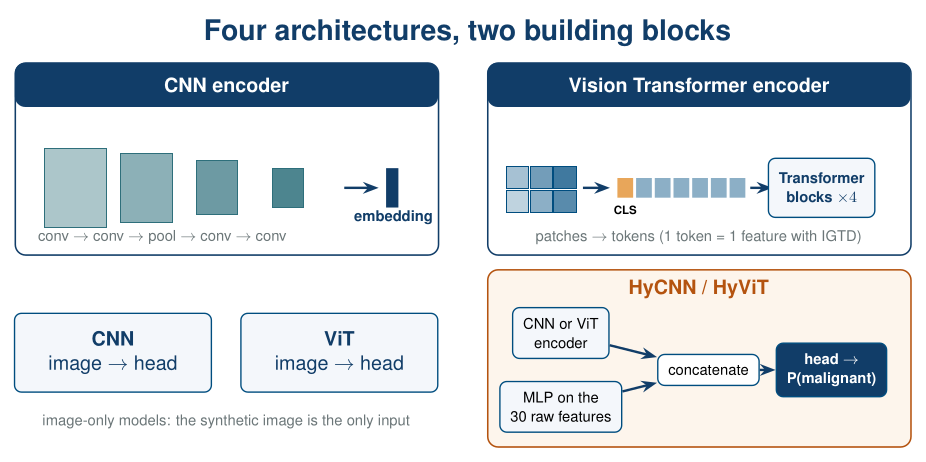
Figure 6. Four architectures built from two encoders. Image-only models use the synthetic image alone; the hybrids concatenate the image embedding with an MLP embedding of the original features before the classification head.
8.1. CNN encoder
class CNNEncoder(nn.Module):
    # Two convolutional stages, then global average pooling -> embedding
    def __init__(self, in_ch=1, width=32):
        super().__init__()
        def block(c_in, c_out):
            return nn.Sequential(nn.Conv2d(c_in, c_out, 3, padding=1), nn.BatchNorm2d(c_out), nn.ReLU())
        self.stage1 = nn.Sequential(block(in_ch, width), block(width, width), nn.MaxPool2d(2))
        self.stage2 = nn.Sequential(block(width, 2 * width), block(2 * width, 2 * width))  # Grad-CAM looks here
        self.pool = nn.AdaptiveAvgPool2d(1)
        self.out_dim = 2 * width

    def forward(self, x):
        return self.pool(self.stage2(self.stage1(x))).flatten(1)
8.2. Vision Transformer encoder
The ViT is written from scratch in a few lines. Each transformer block keeps its attention weights, which we need for attention rollout.
class TransformerBlock(nn.Module):
    def __init__(self, dim, heads, mlp_ratio=2.0, dropout=0.1):
        super().__init__()
        self.norm1 = nn.LayerNorm(dim)
        self.attn = nn.MultiheadAttention(dim, heads, dropout=dropout, batch_first=True)
        self.norm2 = nn.LayerNorm(dim)
        hidden = int(dim * mlp_ratio)
        self.mlp = nn.Sequential(nn.Linear(dim, hidden), nn.GELU(), nn.Dropout(dropout),
                                 nn.Linear(hidden, dim), nn.Dropout(dropout))
        self.last_attn = None

    def forward(self, x):
        h = self.norm1(x)
        a, w = self.attn(h, h, h, need_weights=True, average_attn_weights=False)
        self.last_attn = w.detach()                  # (batch, heads, tokens, tokens)
        x = x + a
        return x + self.mlp(self.norm2(x))


class ViTEncoder(nn.Module):
    # Patchify -> linear embedding + [CLS] token + positions -> transformer blocks -> [CLS] embedding
    def __init__(self, img_size, patch=PATCH, in_ch=1, dim=64, depth=4, heads=4, dropout=0.1):
        super().__init__()
        self.grid = (img_size[0] // patch, img_size[1] // patch)
        n_tokens = self.grid[0] * self.grid[1]
        self.patch_embed = nn.Conv2d(in_ch, dim, kernel_size=patch, stride=patch)
        self.cls = nn.Parameter(torch.zeros(1, 1, dim))
        self.pos = nn.Parameter(torch.zeros(1, n_tokens + 1, dim))
        nn.init.trunc_normal_(self.cls, std=0.02)
        nn.init.trunc_normal_(self.pos, std=0.02)
        self.drop = nn.Dropout(dropout)
        self.blocks = nn.ModuleList([TransformerBlock(dim, heads, dropout=dropout) for _ in range(depth)])
        self.norm = nn.LayerNorm(dim)
        self.out_dim = dim

    def forward(self, x):
        tokens = self.patch_embed(x).flatten(2).transpose(1, 2)            # (batch, n_tokens, dim)
        cls = self.cls.expand(tokens.shape[0], -1, -1)
        tokens = self.drop(torch.cat([cls, tokens], dim=1) + self.pos)
        for block in self.blocks:
            tokens = block(tokens)
        return self.norm(tokens[:, 0])                                     # the [CLS] token
8.3. Image-only and hybrid heads
class ImageClassifier(nn.Module):
    # CNN or ViT alone: image -> logit (the tabular input is ignored)
    def __init__(self, encoder):
        super().__init__()
        self.encoder = encoder
        self.head = nn.Sequential(nn.Dropout(0.2), nn.Linear(encoder.out_dim, 1))

    def forward(self, img, tab=None):
        return self.head(self.encoder(img)).squeeze(1)


class HybridClassifier(nn.Module):
    # HyNN: image branch (CNN or ViT) + MLP branch on the original features, fused by concatenation
    def __init__(self, encoder, n_tab, hidden=64):
        super().__init__()
        self.encoder = encoder
        self.mlp = nn.Sequential(nn.Linear(n_tab, hidden), nn.ReLU(), nn.Dropout(0.2),
                                 nn.Linear(hidden, hidden), nn.ReLU())
        self.head = nn.Sequential(nn.Dropout(0.2), nn.Linear(encoder.out_dim + hidden, 64),
                                  nn.ReLU(), nn.Linear(64, 1))

    def forward(self, img, tab):
        z = torch.cat([self.encoder(img), self.mlp(tab)], dim=1)
        return self.head(z).squeeze(1)


N_TAB = len(FEATURES)
BUILDERS = {
    "CNN":   lambda: ImageClassifier(CNNEncoder()),
    "ViT":   lambda: ImageClassifier(ViTEncoder((H, W))),
    "HyCNN": lambda: HybridClassifier(CNNEncoder(), N_TAB),
    "HyViT": lambda: HybridClassifier(ViTEncoder((H, W)), N_TAB),
}
for name, build in BUILDERS.items():
    n_params = sum(p.numel() for p in build().parameters())
    print(f"{name:<6} {n_params:>8,} trainable parameters")
9. Training on one split
9.1. A stable training recipe
With only 398 training and 85 validation patients, training curves are naturally noisy: one confidently wrong validation patient is enough to make the loss jump. Besides fixing the input scale (Section 7.1), the recipe below uses standard tools that make optimisation smoother:
| Ingredient | Why |
|---|---|
| AdamW with a moderate learning rate (5e-4) and weight decay | smaller, regularised steps |
| Linear warm-up + cosine decay of the learning rate | avoids early instability, especially for the ViT, and refines at the end |
| Label smoothing (0.05) | prevents over-confident logits, which cause loss spikes on a small validation set |
| Gradient clipping (norm 1.0) | caps occasional large updates |
| Early stopping on the validation loss (patience 20) | keeps the weights of the best epoch |
The recipe is fixed in advance and is not tuned on the test data. The training functions receive the data as a dictionary {"img", "tab", "y"} of partitions, so Section 10 can call them inside every fold.
def make_loader(data, split, shuffle=False, batch_size=32, seed=SEED):
    ds = TensorDataset(torch.from_numpy(data["img"][split]), torch.from_numpy(data["tab"][split]),
                       torch.from_numpy(data["y"][split].astype(np.float32)))
    gen = torch.Generator().manual_seed(seed)
    return DataLoader(ds, batch_size=batch_size, shuffle=shuffle, drop_last=shuffle, generator=gen)

@torch.no_grad()
def predict_logits(model, img, tab, batch_size=256):
    model.eval()
    out = []
    for i in range(0, len(img), batch_size):
        xb = torch.as_tensor(img[i:i + batch_size], device=DEVICE)
        tb = torch.as_tensor(tab[i:i + batch_size], device=DEVICE)
        out.append(model(xb, tb).cpu())
    return torch.cat(out)

def predict_proba(model, img, tab):
    return torch.sigmoid(predict_logits(model, img, tab)).numpy()

def train(model, data, epochs=80, lr=5e-4, weight_decay=1e-2, warmup=5, patience=20, smoothing=0.05, clip=1.0, seed=SEED):
    # data = {"img": {...}, "tab": {...}, "y": {...}} with "train" and "val" partitions
    model = model.to(DEVICE)
    opt = torch.optim.AdamW(model.parameters(), lr=lr, weight_decay=weight_decay)
    schedule = lambda e: (e + 1) / warmup if e < warmup else 0.5 * (1 + math.cos(math.pi * (e - warmup) / (epochs - warmup)))
    sched = torch.optim.lr_scheduler.LambdaLR(opt, schedule)
    loss_fn = nn.BCEWithLogitsLoss()
    train_loader = make_loader(data, "train", shuffle=True, seed=seed)
    y_val = torch.as_tensor(data["y"]["val"], dtype=torch.float32)
    history = {"train_loss": [], "val_loss": [], "val_auc": []}
    best_loss, best_state, wait = np.inf, None, 0
    for epoch in range(epochs):
        model.train()
        total, n = 0.0, 0
        for img, tab, target in train_loader:
            img, tab, target = img.to(DEVICE), tab.to(DEVICE), target.to(DEVICE)
            soft_target = target * (1 - smoothing) + 0.5 * smoothing
            opt.zero_grad()
            loss = loss_fn(model(img, tab), soft_target)
            loss.backward()
            nn.utils.clip_grad_norm_(model.parameters(), clip)
            opt.step()
            total += loss.item() * len(target)
            n += len(target)
        sched.step()
        val_logits = predict_logits(model, data["img"]["val"], data["tab"]["val"])
        val_loss = loss_fn(val_logits, y_val).item()
        history["train_loss"].append(total / n)
        history["val_loss"].append(val_loss)
        history["val_auc"].append(roc_auc_score(data["y"]["val"], val_logits.numpy()))
        if val_loss < best_loss - 1e-4:
            best_loss, best_state, wait = val_loss, copy.deepcopy(model.state_dict()), 0
        else:
            wait += 1
            if wait >= patience:
                break
    model.load_state_dict(best_state)
    return model, history
9.2. A first look at the results
SINGLE = {"img": X_img, "tab": X_tab, "y": y}            # the 70/15/15 split of Section 3
models, histories, deep_results = {}, {}, []
for name, build in BUILDERS.items():
    set_seed()                                   # same initial conditions for every model
    t0 = time.time()
    models[name], histories[name] = train(build(), SINGLE)
    prob = predict_proba(models[name], X_img["test"], X_tab["test"])
    deep_results.append(report(name + (" (image + table)" if name.startswith("Hy") else " (image)"), y["test"], prob))
    print(f"{name:<6} trained in {time.time() - t0:5.1f} s, {len(histories[name]['val_loss'])} epochs")

fig, axes = plt.subplots(1, 4, figsize=(13, 2.9), sharey=True)
for ax, (name, h) in zip(axes, histories.items()):
    ax.plot(h["train_loss"], color=TEAL, label="train (smoothed labels)")
    ax.plot(h["val_loss"], color=ORANGE, label="validation")
    ax.axvline(int(np.argmin(h["val_loss"])), color="grey", ls=":", lw=1)
    ax.set_title(name); ax.set_xlabel("epoch")
axes[0].set_ylabel("BCE loss"); axes[0].legend(fontsize=8)
plt.tight_layout()
plt.show()

pd.DataFrame(baseline_results + deep_results).set_index("model").round(3)
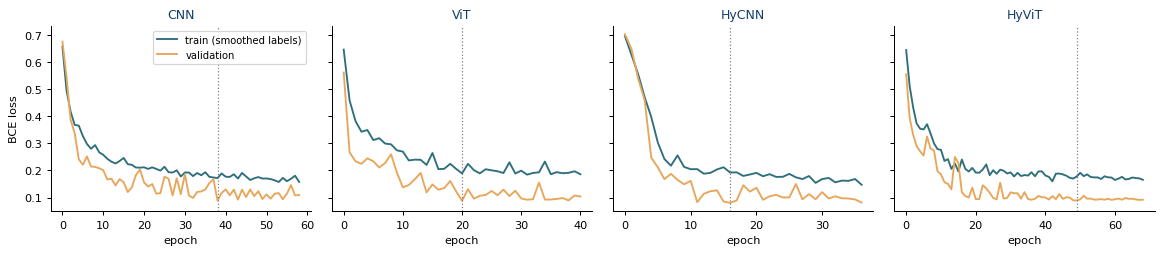
(CNN, ViT, HyCNN and HyViT training histories on one split. These curves are an initial demonstration rather than a reliable performance estimate.)
Recorded notebook output (not recomputed for this article):
| model | accuracy | balanced acc. | F1 (malignant) | ROC-AUC | Brier |
|---|---|---|---|---|---|
| Logistic regression (table) | 0.965 | 0.953 | 0.951 | 1 | 0.026 |
| Gradient boosting (table) | 0.977 | 0.969 | 0.968 | 0.999 | 0.019 |
| CNN (image) | 0.977 | 0.969 | 0.968 | 1 | 0.015 |
| ViT (image) | 1 | 1 | 1 | 1 | 0.003 |
| HyCNN (image + table) | 1 | 1 | 1 | 1 | 0.007 |
| HyViT (image + table) | 0.988 | 0.984 | 0.984 | 1 | 0.005 |
Do not report this table.
The curves are stable, and early stopping keeps the epoch with the lowest validation loss (dotted line); the training loss stays higher because it is computed on smoothed labels and with dropout active. On this test partition of only 86 patients, the ViT and HyCNN classify every patient correctly and the ViT has the lowest Brier score (0.003). Section 10 shows that this is the luck of the split: over 10 folds, the ViT is the most variable model and has the worst mean Brier score (0.034 ± 0.023).
Where to go next
Continue with Part II — Reliable Evaluation and Explainability for repeated cross-validation, statistical tests and feature attribution.
Continue learning Artificial Intelligence
Explore practical courses on AI, Machine Learning, Deep Learning, Python, R and applied data science.

© Manuel Castillo-Cara, PhD. Content licensed under CC BY-NC 4.0 unless otherwise stated.